
Create customize cursor
Posted by AdminPUBLISHERS DESCRIPTION:
Creating cursor from image
This is a standard function of every cursor maker. RealWorld Cursor Editor offers two ways to convert images to static or animated cursors. Prepared image can be converted using a wizard accessible from the main application screen. If an image needs to be modified before conversion, it can be opened in a built-in raster image editor. A "Remove empty borders" operation is extremely useful when preparing images for conversion.
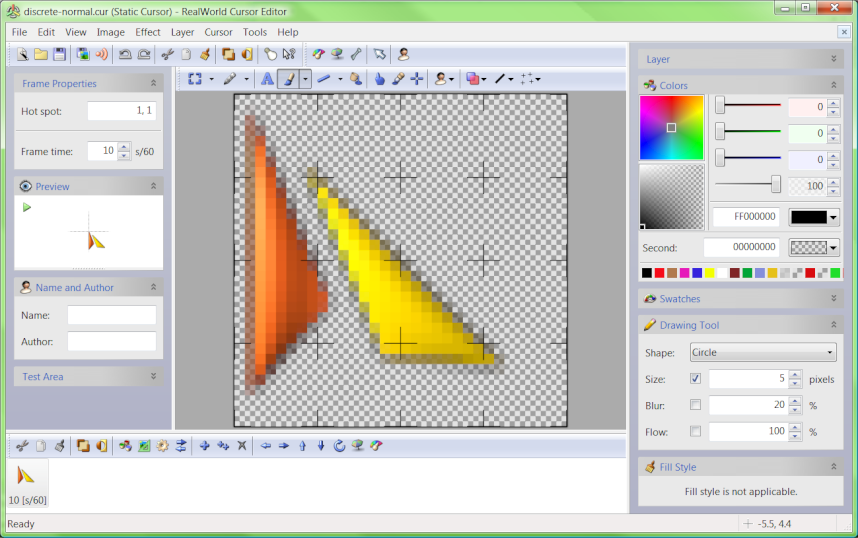
Modifying cursor image and hot spot
Image in a static or animated cursor can be modified using drawing tools (Pencil, Line, Curve, Rounded Rectangle, Ellipse, Flood Fill, Text, and Projected Shadow) or by filters. Every image can be opened in a separate raster editor window. The raster editor can run filters (Sharpen, Soften, Motion Blur, Drop Shadow, Brightness, Contrast, Gamma, Transparency, Rotate, and custom filters) on the entire image or on selected area.
Cursor hot spot can be changed by clicking on a pixel in raster editor. In case of animated cursor, hot spot can be changed on mupltile frames at once by entering new coordinates.
Modifying animation
Frames in animated cursors can be moved or copied using mouse or clipboard in an intuitive manner. Appending one animation to another is a matter of few seconds. The animated cursor editor allows running filters on all selected frames at once.
Setting frame duration is as easy as clicking on a frame, typing a number, and pressing Enter. Alternatively, duration of multiple frames can be changed at once using the Frame Duration panel.
Creating cursors from 3D models
The latest version features an optional set of shareware tools for 3D modelling, rendering and conversion to static or animated cursors. Parameterized 3D model can be used to create an animated cursor where each frame is rendered using different parameter values.
Cursor maker features
Outstanding compatibility
RealWorld Cursor Editor implements and actively uses the custom frame sequence feature of the Microsoft .ani format. This feature enables to optimize animations with repeating frames and enables to efficiently create very long animations with variations. Imagine a butterfly flying between different flowers - by reusing the frames, you can create a very long non-repeating animation.
Aside from the extensive .ani feature support, the editor can also read and fix files with incorrect headers produced by some animated cursor makers.
Drag and drop frenzy
Result of a drag and drop operation depends on what is dragged and where it is droped it in the application window:
- Drop supported files (images or cursors) on application caption - files are opened.
- Drop image file(s) on a raster image editor window - image is pasted as new selection.
- Drop cursor file on list of cursor images - dropped cursor is blended with current one.
- Drop supported files on an animated cusor frame list - new frames are appended to the animated cursor (images are resized if neccessary).
- Drag and drop frames in the animated cusor frame list - frames are moved or copied if CTRL key is down.
Operating Systems: Windows 2003/XP/Vista
File size: 9.8 MB
Developer: r-wdesigner.com

 | Posted in »





22 comments: Responses to “ Create customize cursor ”
By editor on June 23, 2008 at 9:21 PM
HI ,
Increase your revenue 100% of your blog by converting into free website.
Convert your blog "yourname.blogspot.com" to www.yourname.com completelyfree.
Become proud owner of the (.com) own site .
we provide you free website+ free web hosting + list of your choice of
scripts like(blog scripts,CMS scripts, forums scripts and many scripts)
all the above services are absolutely free.
You can also start earning money from your blog by referring your friends.
Please visit www.hyperwebenable.com for more info.
regards
www.hyperwebenable.com
By Anonymous on September 6, 2008 at 11:06 PM
Hi,
I'm Alisha from Wowzio, and I'm excited to tell you about our new widget platform that helps bloggers increase readership by providing engaging widgets containing your blog's rich content. You can check out widgets customized for your blog here:
Wowzio Widgets for your Blog
I wanted to reach out to you to ask for your feedback on these widgets (feel free to install them on your blog, if you feel they are a good fit). I'm sorry for leaving this message via a comment, it's not at all our intent to spam you ( which is why i'm leaving this comment on an older post and you can always remove this comment ). Again, we would love to hear your feedback.
Thanks,
Alisha Wright
alisha.wright1@gmail.com
By Anonymous on September 25, 2008 at 7:23 PM
IPNS provides IT infrastructure services - it infrastructure management, infrastructure management services, Infrastructure management solutions
For more info :IPNS
By Unknown on February 7, 2009 at 10:31 PM
f you have blogspot blog , please join top blogger blog sites list. Register, upload your banner and add the voting code to your website. Get traffic
www.root-top.com/topsite/blogspot/
thanks
By Onsite Support on April 14, 2009 at 9:25 PM
i have not heard about RealWorld Cursor editor this is something new for me
let me try and see first
Windows Dedicated Server
By arnv on May 5, 2009 at 10:13 PM
Its a nice blog!
Invitation letter
By Anonymous on July 9, 2009 at 3:39 PM
Thanks its simply great and I would say its a learning experience visiting your blog.
Regards
Alienware Laptop Video Cards
www.ztronics.com
By Unknown on October 16, 2009 at 4:13 PM
Its an amazing blog. i have searched for the image and cursor making tools.so i have vote it best
Shoping Card
By Unknown on December 2, 2009 at 2:52 PM
Hi,
That's a great info. Thanks for sharing, really like your view. I can see that you are putting a lot of time and effort into your blog. Keep posting the good work.
Professional Business Plan
By Mike on March 4, 2010 at 11:58 PM
Nice Blog, I got lot of knowledge from it. Keep it up. Thank you so much.
Mike
Repair Outlook PST file
By Unknown on August 20, 2010 at 12:52 PM
thanks for the cursor!
Managed hosting services
By Abu AlHaytham on September 18, 2010 at 6:42 AM
thank's for the great blog
ZaFile
By Anonymous on December 9, 2010 at 11:41 AM
thanks for your infoFaucets
By AndyVan on July 27, 2011 at 6:38 PM
I have not used RealWorld Cursor , but it seems to me that it has good features and the result could be really awesome!
Man and Van
By Anonymous on July 27, 2011 at 7:39 PM
RealWorld cursor is really great and has all the necessary features.
Cleaning Services
By Mr. Company on July 29, 2011 at 10:38 PM
This comment has been removed by the author.
By Kate London on August 29, 2011 at 3:44 PM
This comment has been removed by the author.
By Anonymous on September 20, 2011 at 8:10 PM
This comment has been removed by a blog administrator.
By Anonymous on September 20, 2011 at 8:11 PM
This comment has been removed by a blog administrator.
By Kate London on July 17, 2013 at 9:45 PM
s
By Mr. Company on July 17, 2013 at 9:47 PM
d
By AndyVan on July 17, 2013 at 9:49 PM
d